Marker Work Modes
Work Modes are Display Attributes (F10) presets in Marker to allow production teams to define, manage and apply saved display attributes tailored to specific Production Diagrams.
The assigned display attributes will be associated only to current Work Mode.
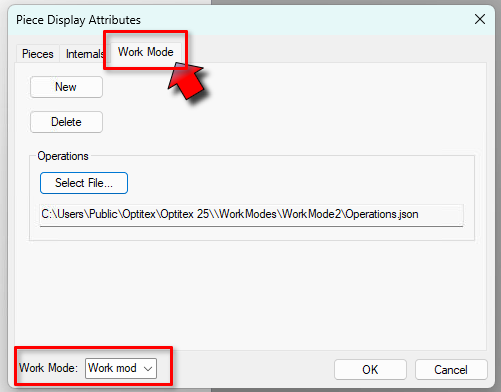
Go to the Work Modes tab on the Display Attributes (F10, to create, manage and load your saved presets :
 Important
For Production Diagram lines, symbols and text to show, you must do the following:
-
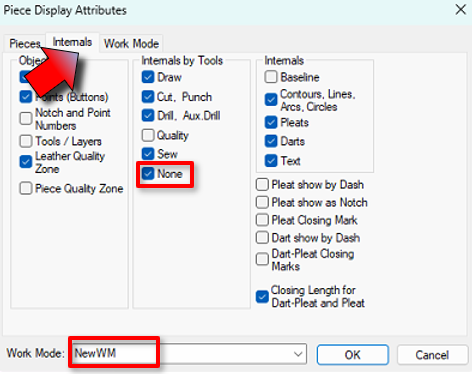
Open Piece Display Attributes (F10)
-
Go to the the Internals tab
-
Under internals by Tools, select None
-
Make sure to select the appropriate Production Diagram work mode in the drop down box at the bottom.
-
Save your Production Diagram
 Note:
Note:
-
The Work Modes` files are saved under: C:\Users\Public\Optitex\Optitex 25\WorkModes
-
The Work Modes tab is currently only available when a Production Diagram file is loaded.
 See also: